

Hashtag Quick-Reference: Formulas at a Glance
- Name blend: First syllable of each name + surname. Example: BenAndSophiaWilliams = BenSophWed
- Surname + year: #TheMillersWed2026 / #WeddingMillers2026
- Name + verb: #SarahAndJakeKiss / #LilyMeetsLuca
- Pun formula: Name sound + wedding word. Example: #TotallyBrody (Brady + totally)
- Classic all-in: #FirstNameFirstName + “I Do” / “Wed” / “2026”
- Year suffix tip: Always add the year to distinguish from previous weddings using the same name combination
- Length sweet spot: 20-30 characters total (easy to type, easy to read on a sign)
How to Create a Wedding Hashtag That Works
A hashtag that sticks has three qualities: it is easy to type on a phone, it sounds like it belongs to you as a couple, and it is not already claimed by another event. Start with your names and work from there.Name-combination formulas
- Both first names + shared last name: #EmmaAndJackHarrison
- Blended first names: Take the first half of each name and combine. Mia + Daniel = #Mianiel2026 (best when the blend sounds natural)
- First + last name of one partner: #HarrisonsWedding
- Bride or groom’s name + possessive: #SophieAndCo or #LucasGetsMarried
- Initials + wedding word: #JandMWed / #JMLoveStory
Pun and personality options
If you want something guests will smile at when they type it, lean into a pun on your surname or on your relationship story.- Surname pun: Last name “Wood” = #TodayIsGoodWeWood / #WoodYouBelieveIt
- Meeting story: Met on a hike = #TheyFoundEachOther / #TrailToTheAltar
- Location nod: Coastal venue = #TiedAtTheTide2026
- Simple and warm: #ForeverFirstName + Surname
Year suffix: always add it
Popular name combinations get reused across weddings. #EmmaAndJack likely already exists. #EmmaAndJack2026 almost certainly does not. The year also turns your hashtag into a timestamp, which is useful when you look back at the photo stream years later.
How to Check If Your Wedding Hashtag Is Available
Before you commit to a hashtag, search it on Instagram. A handful of posts from years ago is usually fine as long as the tag is clearly inactive. If the first three rows of results are from a recent wedding, pick a variation.Step-by-step availability check
1. Search Instagram directly
Open Instagram, tap the search icon, switch to Tags, and type your hashtag without the # symbol. If no posts appear, it is free. If results are 2+ years old and sparse, it is effectively free.2. Check TikTok if your guests skew younger
TikTok has become a secondary sharing platform at weddings, especially for reception highlights. Do a quick hashtag search there as well. You do not need a separate TikTok hashtag; the same one usually works.3. Do a web search
Search for the hashtag as a text string in quotes. This surfaces wedding websites, programs, and vendor posts that might be using the same tag without heavy Instagram traction.4. Book it with a test post
Post a private photo using your chosen hashtag right now. This stakes your claim and gives you a single existing post to compare against when guests start tagging.Wedding Hashtag Sign Wording: 20+ Examples From Simple to Funny
The framing line above the hashtag does as much work as the hashtag itself. It sets the tone and tells guests exactly what to do.Simple and direct
#EmmaAndJack2026
#EmmaAndJack2026
#EmmaAndJack2026
Warm and personal
#EmmaAndJack2026
Tag your photos
#EmmaAndJack2026
#EmmaAndJack2026
Fun and playful
#EmmaAndJack2026
Tag your pictures
#EmmaAndJack2026
#EmmaAndJack2026
#EmmaAndJack2026
Two-line bride-and-groom structure
Tag your photos: #EmmaAndJack2026
Photo booth specific
Share at #EmmaAndJack2026
#EmmaAndJack2026
Bar sign version (pairs with a drinks menu)
Ceremony and formal-area wording
Cameras out at the reception.
Tag: #EmmaAndJack2026
Minimalist one-line options
Where to Display Your Wedding Hashtag Sign
One sign is rarely enough. Guests rotate through different areas across the evening, and a hashtag sign works best when it catches people in a sharing moment. For broader inspiration on all the signs you might order for your day, see our guide to wedding welcome sign wording.Welcome table or entry area
The welcome table is the highest-traffic spot in the first 30 minutes. Guests are arriving, mingling, and looking for things to do. A hashtag sign here introduces it early before the evening gets busy and people forget to look for it. Pair it with your seating chart and an order-of-events card so the sign gets read, not overlooked.Bar area
People linger at the bar and they have their phones out. A hashtag sign near the cocktail menu or drink station gets seen repeatedly throughout the night. This is one of the highest-conversion placements for user-generated photos because guests are relaxed and in a social mood.Photo booth
If you have a photo booth or designated selfie wall, a hashtag sign is essential. Guests are already in photo mode. Having the hashtag right there means they tag the post before they even leave the booth. Size up here: an A2 or larger format reads clearly in a group selfie.Reception tables
A small table card-format hashtag reminder at each place setting means guests see it while they sit down, during dinner, and again when they check their phones between courses. This works especially well as a companion to the main display sign rather than a standalone placement.Bathroom or powder room mirror
Counterintuitive, but genuinely effective. People take selfies in mirrors. A small framed hashtag sign in the bathroom gets photographed more often than couples expect, and it reinforces the tag at a moment when guests already have their phones out.Including Your Hashtag on Other Wedding Stationery
The sign is the main prompt, but reinforcing your hashtag across your stationery suite means guests encounter it before the day even arrives. For details on the insert cards that work well for this purpose, see our guide to wedding invitation insert cards.Details or information card
Your details card is the right place to include the hashtag. Add it at the bottom of the card under the travel or accommodation section. A short one-liner works well: “Share your photos with us at #YourHashtag2026.” Guests keep invitation suites on their fridges and side tables in the weeks before the wedding, so they see the hashtag multiple times before the day.Order of events or ceremony program
A line at the bottom of the program is subtle and appropriate. Keep it brief: “Reception photos: #YourHashtag2026.” Guests who are sitting during the ceremony tend to read every line of a program, so the retention here is high.Wedding website
Add the hashtag to the homepage of your wedding website and to the RSVP confirmation email. Guests who book accommodation or confirm via your site have weeks to absorb the hashtag before the day.Save the dates
If your save the dates are going out 6-12 months ahead, including the hashtag there plants it early. Keep the wording light: “We’ll be using #YourHashtag2026 – save it for the big day.”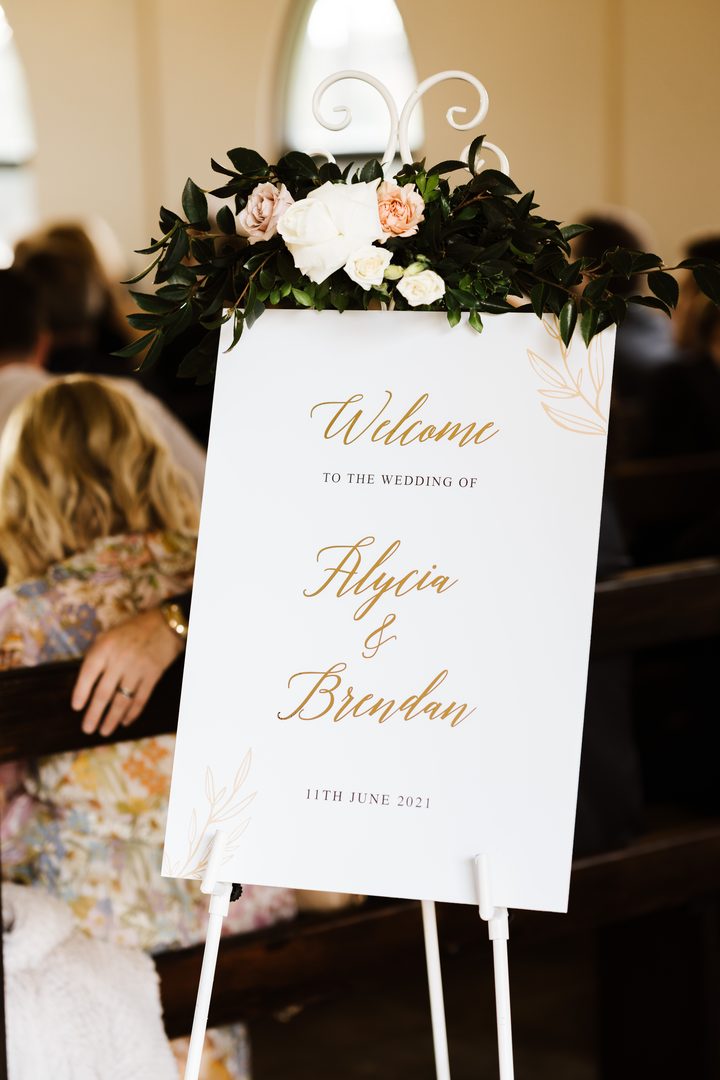
Wedding Hashtag Sign Design Tips: Size, Format, and Layout
A hashtag sign that cannot be read from four feet away is not doing its job. Here is how to make sure yours lands.Size recommendations by placement
- Welcome table or entry: A2 (16.5″ x 23.4″) or A1 (23.4″ x 33.1″) for easy readability from a distance
- Bar area: A3 (11.7″ x 16.5″) works well here, sitting alongside a cocktail menu without dominating the space
- Photo booth display sign: A2 or larger so the hashtag reads clearly in selfie photos taken from arm’s length
- Table cards: A6 or DL card format; this is a reminder format, not the primary display
- Bathroom: 5″x7″ framed card is plenty for this intimate setting
Font and layout best practices
The hashtag itself needs to be the largest text on the sign. A common mistake is designing the framing copy at the same weight as the hashtag, so the eye does not know where to land. Use a contrast in size and weight: framing copy in a light or medium weight, the hashtag in bold and noticeably larger.- Minimum recommended hashtag font size for an A2 sign: 72pt or larger
- High-contrast combinations work best: dark type on light stock, or light type on a dark PVC board
- Script fonts are beautiful but reduce readability at speed; use script for the framing copy and a clean sans-serif or serif for the hashtag itself
- Include the # symbol at the same size as the rest of the hashtag so guests do not accidentally leave it off
Material and finish options at Paperlust
Paperlust wedding signs are available in Fabric and Printed PVC Board formats. Both suit hashtag signs well. Fabric has a softer, textural look that photographs beautifully against florals and natural styling; PVC Board prints with sharp, high-contrast clarity and suits modern or minimalist aesthetics. Vinyl Foil finishing in gold, silver, or rose gold is available on signage if you want a metallic accent on your hashtag. Browse the full range at Paperlust wedding signs.After the Wedding: How to Collect Your Hashtag Photos
The hashtag was worth creating only if you actually collect the photos. Do this in the first two weeks while the posts are fresh and Instagram’s search is still surfacing them reliably.How to download and save your tagged photos
1. Search the hashtag immediately after the honeymoon
Open Instagram and search your hashtag. Scroll through every post and save each one you want to keep. Instagram lets you save posts to a private collection within the app (the bookmark icon), which is a useful first pass before downloading.2. Screenshot and ask for originals
Screenshots lose quality. For photos you love, reach out directly to the person who posted them. Most guests are genuinely happy to send the original file when asked; a short DM is all it takes.3. Use a third-party aggregator
Services like Later, Planoly, and similar tools can export tagged posts from a hashtag. Note that Instagram’s API access for third-party apps changes periodically, so check whether the service you choose currently supports hashtag export. Do not rely on any single tool as a long-term archive.4. Download your own Instagram archive
If you reposted tagged photos to your own account, request a data download from Instagram (Settings > Your Activity > Download your information). This gives you full-resolution copies of everything you posted and saved.Organizing after collection
Create a shared folder (Google Drive or Dropbox) and sort photos by: ceremony, cocktail hour, reception, photo booth. Share it with your partner and anyone who was part of the event before sending photos to your photographer for the full album. User-generated content often captures expressions and candid moments the photographer missed, and a few of these shots end up being favorites.FAQs
How do I check if my wedding hashtag is taken?
Search the exact hashtag on Instagram by tapping the search icon, switching to the Tags tab, and typing your hashtag without the # symbol. If no results appear, it is available. If results exist but are years old and sparse, the tag is effectively unclaimed. Adding the year to your hashtag (for example, #SmithWedding2026) almost always ensures a unique result because name combinations from previous years are unlikely to match your exact format.
How big should a wedding hashtag sign be?
For a welcome table or entry area, A2 (16.5″ x 23.4″ / 420mm x 594mm) is the most practical size: large enough to read easily from a few feet away, but not so large it dominates the table styling. For a photo booth where the sign appears in selfies, go A2 or larger so the hashtag reads clearly in the frame. Bar area signs and table cards can be smaller: A3 or DL card format works well as a secondary reminder.
When should I create my wedding hashtag?
Create and claim your hashtag as early as possible, ideally when you send your save the dates. Putting it on your save the dates means guests see it 6-12 months before the day. The sooner it is on Instagram (even as a single private post), the sooner you can confirm no one else is using it.
How many wedding hashtag signs do I need?
Most couples order 2-3 hashtag signs: one for the welcome table or entry, one near the bar, and one at or near the photo booth if they have one. Table card reminders can supplement these without replacing them. One large display sign rarely covers all the areas where guests are likely to check their phones and share.
What font style works best for a wedding hashtag sign?
Use a clear, readable font for the hashtag itself. Script fonts look beautiful in mockups but can be hard to read quickly in person, especially in low reception lighting. A common approach is to use a script or decorative font for the framing line (“Share your photos”) and a clean serif or sans-serif for the hashtag text, with the hashtag noticeably larger than the framing copy. This ensures the eye finds the hashtag first.
Can I include my wedding hashtag on my invitations?
Yes, and it is a good idea. The best place is your details or information insert card, at the bottom after venue and accommodation information. Keep it to one line: “Share your photos with us at #YourHashtag2026.” You can also add it to your order-of-events program and wedding website. Starting early means guests have weeks to memorize the hashtag before the day.
What is the ideal length for a wedding hashtag?
Aim for 20-30 characters including the # symbol. Shorter hashtags are easier to type correctly without autocorrect interference; longer ones increase the chance of typos and reduce the number of correctly tagged posts you collect. If your combined names create a longer tag naturally, adding just a short year suffix (2026) is a better approach than stacking multiple words.
What material are Paperlust wedding hashtag signs printed on?
Materials for Paperlust wedding signs include printed PVC board, fabric, acrylic, and mirror acrylic. Vinyl Foil finishing in gold, silver, or rose gold is available on signage for a metallic accent.
Should my hashtag sign match the rest of my wedding stationery suite?
It does not have to match exactly, but a consistent color palette and typography family ties the sign visually to your overall aesthetic. If your invitations use a specific font pairing or color, carry that through to your hashtag sign for a cohesive look in photos. Paperlust designers work with you to align signage to your invitation design on request.
Hashtag set? Browse our wedding sign designs to display it, or order a $5 sample pack to see the print quality first.
Browse Wedding SignsOrder $5 Sample PackReady to design your wedding hashtag sign?
Browse Paperlust’s full range of fabric and PVC board wedding signs, customized by a professional designer within 1-2 business days.