
Print Canva wedding invitations professionally in Melbourne
Your Canva design is finished, but it still needs a print-ready PDF and the right stock. We print Canva wedding invitations in Melbourne on heavy cotton or matte card, with white envelopes included and a designer proof before anything goes on press.
What the service includes
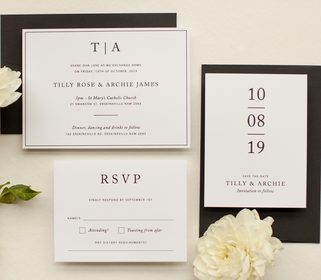
Upload your file through the quote form and we will quote within 1 to 2 business days. Choose digital print, metallic print, white ink, flat foil, letterpress or foil stamping, with minimums from 10 for digital, metallic, white ink and flat foil, and 50 for letterpress and foil stamping. White envelopes are included; coloured envelopes start from A$1.10 each.
Need the step-by-step Canva export guide for your invitation for a clean PDF export? If your design is finished in another program, use the print your own design hub instead.
Heavy Paper Choices
Print on Wild Cotton 300gsm, Matte Double Thick 600gsm, Linen 350gsm and more. Your Canva design moves onto stocks the office-store range does not include.
Real Foil and Letterpress
Add flat foil, custom foil stamping or letterpress to a Canva file. The design team can prepare clean vector artwork for these finishes, quoted from A$75.
A Proof Before Print
Every order receives a designer proof within 1 to 2 business days after you accept the quote. Nothing is printed until you approve it, and revision rounds are unlimited.
PRINT CANVA INVITATIONS
- HOW IT WORKS
UPLOAD AND QUOTE
Send your exported PDF with bleed and crop marks through the quote form. Our team reviews it and returns a detailed quote within 1 to 2 business days.
PROOF AND APPROVE
After you accept, we create a designer proof within 1 to 2 business days. You can refine it over unlimited rounds at no charge before approving.
PRINT AND SHIP
Once you approve, your cards go into production. Digital print takes 3 to 5 working days; flat foil takes 7 to 10 working days.
Print Your Own Design
Your guide to Canva invitation printing
Why a specialty printer suits a Canva design
Canva's own print service and office-store printers are limited to digital print on a narrow range of stocks. They cannot produce letterpress, foil stamping, die cutting or cotton stock. With Paperlust, your design can move onto Wild Cotton 300gsm, Matte Double Thick 600gsm or Linen 350gsm, and you can add flat foil or letterpress to a digital base. White envelopes are included free with every invitation order, and a designer proof arrives before anything prints, so you approve the result before production.
Exporting the right file from Canva
From your Canva design, choose Share, then Download, then PDF Print. Tick bleed and crop marks when Canva offers them, set quality to maximum, and avoid PDF Standard and PNG. PDF Print exports at 300 dpi, and you need a 3 mm bleed on every side with text and key artwork kept at least 6 mm inside the trim. Canva works in RGB and converts to CMYK on this export; deep blues, purples and jewel tones can shift, so compare those areas carefully on the proof before approving. Keep fonts outlined or embedded and images embedded, and send a PDF, AI, EPS or PSD.
What Canva cannot export for foil or letterpress
Canva cannot export a separate foil or letterpress layer. Foil stamping and letterpress require clean single-colour vector artwork, usually AI or EPS, with one file or layer per foil or ink colour. Photos, gradients and soft shadows cannot be foiled or letterpressed. If your Canva design includes those finishes, our design team can prepare the needed vector file from your original, with file preparation starting from A$75; the quote will state the fee before you pay.
Etsy, Templett and Corjl templates
Templates from Etsy, Templett and Corjl follow the same file expectations: export at 300 dpi as a PDF, with bleed if offered. Before ordering, check the template licence allows professional printing. If the seller forgot to include bleed or the file arrives as a PNG, we will tell you in the quote and can adjust it for a fee stated there.
Print methods for a Canva file
Digital print is the natural fit for full-colour photos, watercolour and gradients. Start at a minimum of 10 and allow 3 to 5 working days after approval. Metallic print gives a digital shimmer with the same minimum and window. White ink runs on kraft, vellum and dark or coloured stocks such as black and navy, with a 10-card minimum and the same 3 to 5 working days. Flat foil applies mirror-bright metallic without a custom die, with a minimum of 10 and a 7 to 10 working day production window.
Flat foil comes in gold, silver, rose gold and copper; foil stamp adds 11 more colours including holographic. Letterpress presses a single ink colour into thick cotton paper and suits clean typography and line art. Foil stamp uses a custom die, heat and pressure to press metallic foil into the card for shine with a tactile impression. Both require a minimum of 50 and take 20 to 23 working days after proof approval; each extra letterpress ink colour needs its own plate.
Paper choices worth feeling first
Digital print defaults to Matte 250gsm, and you can also choose Linen 350gsm, Metallic 300gsm, Wild Cotton 300gsm, Vellum 200gsm, Matte Double Thick 600gsm, Kraft 290gsm or colour stocks including black and navy. Flat foil works on Matte 300gsm, Matte Double Thick 600gsm and colour stocks; letterpress and foil stamp run on Wild Cotton 300gsm, with letterpress also on Wild Cotton 600gsm.
After you upload: quote, proof, print and pricing
Upload your finished artwork through the quote form and our team will respond with a detailed quote within 1 to 2 business days. Printing a supplied design starts from A$3.50 per card as an entry estimate for digital print with white envelopes included; foil, letterpress and foil stamp cost more per card. Custom quantities work too: 11 to 14 cards are priced at the 10 rate, and 15 to 19 at the 20 rate. Print-only jobs are paid in full before proofing starts. If the file is not print-ready, the quote will note any design preparation fee from A$75. The form accepts up to 20 MB per file in JPG, PNG, ZIP, RAR or PDF.
After payment, a designer proof arrives within 1 to 2 business days. Proof rounds are unlimited and carry no charge; most people need three to five rounds. Nothing prints until you approve it. Once approved, production windows apply: digital print, metallic and white ink take 3 to 5 working days, flat foil takes 7 to 10 working days, and letterpress or foil stamp take 20 to 23 working days. Expedited printing costs A$50 per order and shortens digital print and white ink to 1 to 2 working days, or flat foil to 3 to 5 working days; it is not available for letterpress, foil stamp or Vellum paper.