
Professional printing for Canva wedding invitations
Your Canva invitation design is finished, and the PDF is sitting in your downloads folder. Upload it here to print it professionally on heavy cardstock, with white envelopes included, foil or letterpress options, and a proof before anything prints.
What this print service includes
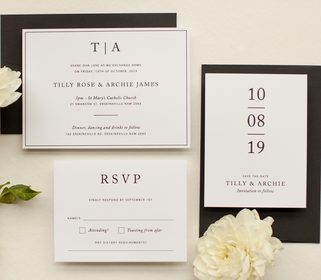
Send us a print-ready Canva PDF and we print it in Melbourne, then ship to the United States by DHL Express. Digital print has a 10-card minimum and runs 3 to 5 working days after proof approval. White envelopes are included free with every invitation order.
Need help exporting a file? Read the Canva export guide for clean, print-ready PDFs or browse ways to print your own design from Canva and other templates.
Proof Before Printing
A designer proof arrives within 1 to 2 business days of quote acceptance. Nothing prints until you approve it, and revision rounds are unlimited at no charge.
Envelopes Included
White envelopes come free with every invitation. Colored envelopes start at US$0.88 each, with guest address printing from US$0.16 per envelope.
Heavy Cotton and Foil
Choose full color digital on Matte 250gsm, or upgrade to cotton, flat foil, letterpress or foil stamp. The smallest digital, metallic, white ink and flat foil order is 10 cards.
PRINT CANVA INVITATIONS
- HOW IT WORKS
UPLOAD AND QUOTE
Attach your print-ready PDF through the quote request form. We reply with exact pricing and lead times within 1 to 2 business days.
PROOF AND APPROVE
After you accept the quote, a designer prepares a proof within 1 to 2 business days. You approve it, with unlimited revision rounds included, before anything prints.
PRINT AND SHIP
Once approved, production runs by method, from 3 to 5 working days for digital and white ink. DHL Express reaches the United States in 2 to 4 business days after dispatch.
Print Your Own Design
Printing a Canva wedding invitation with a specialty printer
Why a specialty printer suits a Canva wedding design
Canva's own print service and office-store printing are digital print on a narrow range of stocks. Neither offers letterpress, foil stamping, die cutting or cotton stock. When you are deciding where to print Canva invitations, the difference is in paper, finish and the proof. When you print Canva wedding invitations with Paperlust, your design moves onto heavy cardstock, textured linen or Wild Cotton, with options like flat foil and letterpress. White envelopes come included free, and a designer proof arrives before anything prints. Digital print remains the fast, full color route for photos, watercolor and gradients.
Export the right file from Canva
From your Canva design, choose Share, then Download, then PDF Print. Tick bleed and crop marks when offered, and set quality to maximum. PDF Print exports at 300 dpi, which is what we need for crisp text and clean edges. Avoid PDF Standard or PNG for printing, because those do not carry the same print data. Keep text and key artwork at least 0.25 in (6 mm) inside the trim line so nothing important gets cut. Canva designs in RGB convert to CMYK on PDF Print export, so deep blues, purples and jewel tones can shift. Check them on the proof before you approve.
What Canva cannot export
Canva cannot export a separate foil or letterpress layer. Foil and letterpress need clean single-color vector artwork, supplied as AI or EPS, with one file or layer per foil or ink color. Photos, gradients and soft shadows cannot be foiled or letterpressed. If your Canva design has those elements and you still want a metallic or letterpress finish, the design team can prepare the artwork from your Canva file for a fee from US$60; your quote will say if this applies.
Etsy, Templett and Corjl templates
Print methods available for a Canva file
Digital print is full color and suits photos, watercolor and gradients, with a minimum of 10 cards and production of 3 to 5 working days. Metallic print is a lower-cost shimmer alternative to foil, with the same 10-card minimum and 3 to 5 working days. White ink prints on kraft, vellum and dark or colored stocks such as black and navy, but not blush paper, again with a minimum of 10. Flat foil gives a smooth, mirror-bright metallic finish without a pressed impression; it needs 10 cards and 7 to 10 working days. Letterpress presses the design into thick cotton paper for a tactile impression, uses one ink color per plate; each extra ink color needs its own plate, and starts at 50 cards and 20 to 23 working days. Foil stamp uses a custom die to press metallic foil into the card with heat and pressure, also from 50 cards and 20 to 23 working days. Foil colors include gold, silver, rose gold and copper; foil stamp adds 11 more colors, including holographic. Embossing is available as a custom-quoted finish.
Paper choices and the sample pack to feel them first
What happens after you upload
Use the quote request form to send your artwork and we reply within 1 to 2 business days. Printing a supplied design starts from US$2.80 per card for digital print with white envelopes included; foil, letterpress and foil stamp cost more per card than digital print, and exact pricing comes in the quote. Custom quantities of 11 to 14 cards are priced at the 10 rate, and 15 to 19 cards at the 20 rate. Print-only jobs are paid in full before proofing starts. A designer proof then arrives within 1 to 2 business days of the quote being accepted, and proof rounds are unlimited at no charge; most customers need three to five rounds.
Production times run from proof approval, not dispatch. Digital print, metallic print and white ink take 3 to 5 working days; flat foil takes 7 to 10 working days; letterpress and foil stamp take 20 to 23 working days. Expedited printing costs US$40 per order and brings digital and white ink to 1 to 2 working days, and flat foil to 3 to 5 working days. It is not available for letterpress, foil stamp or Vellum paper. After production, DHL Express reaches the United States in 2 to 4 business days.